
You are here
jquery 不包含某元素 用 not 来表示 排除 有大用
星期四, 2016-08-11 08:23 — adminshiping1
2.获取id=phpernote下面所有没有class=com的li元素的个数
$('#phpernote li:not(.com)').size();//或者$('#phpernote li').not('.com').length();
3.设置id=phpernote下面所有奇数行的li元素的背景
上面的代码,将把有附加属性"delay",且等于"false"的div排除掉,然后把剩下的div全选中,并设置为红色字体。
来自 http://www.jb51.net/article/49349.htm
下面两个是自己亲自做的 有大用
$(document).ready(function() {
$('.small_jcpd_new:not(.erweima_small_jcpd_new)').mouseover(function(){
});
});
//not里面的参数可以是选择器对象
$('.menuinputul .sondiv').click(function(){
//not里面的参数可以是选择器对象
$('.menuinputul .sondiv').click(function(){
    $('.menuinputul ul').not($(this).siblings('ul')).css('display','none');
    $(this).siblings('ul').toggle();
});
2015-05-31 16:22 最佳答案
可以使用jQuery 遍历中的 not() 方法来排除某些元素,例如根据元素的id,class等排除,示例代码
1 | $("div.content *").not(".keep"); // 表示content类的div下除keep类以外的所有元素;另外,注意*表示所有元素 |
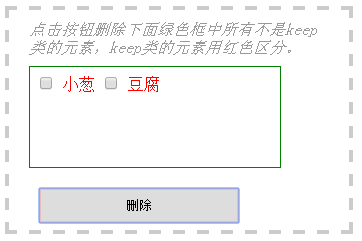
下面给出实例演示:删除content类的div下除keep类以外的所有元素
创建Html元素
12345678910111213<divclass="box"><span>点击按钮删除下面绿色框中所有不是keep类的元素,keep类的元素用红色区分。</span><divclass="content"><inputtype="checkbox"name="item"><span>萝卜</span><inputtype="checkbox"name="item"><span>青菜</span><inputtype="checkbox"name="item"class="keep"><spanclass="keep">小葱</span><inputtype="checkbox"name="item"class="keep"><spanclass="keep">豆腐</span><inputtype="checkbox"name="item"><span>土豆</span><inputtype="checkbox"name="item"><span>茄子</span><inputtype="text"value="我也不是keep类的"></div><inputtype="button"value="删除"></div>设置css样式
123456div.box{width:300px;height:200px;padding:10px20px;border:4pxdashed#ccc;}div.box>span{color:#999;font-style:italic;}.keep{color:red;}div.content{width:250px;height:100px;margin:10px0;border:1pxsolidgreen;}input{margin:10px;}input[type='button']{width:200px;height:35px;margin:10px;border:2pxsolid#ebbcbe;}编写jquery代码
1234567$(function(){$("input:button").click(function() {$("div.content *").not(".keep").each(function() {// "*"表示div.content下的所有元素$(this).remove();});});})观察显示效果
删除前

删除后


这篇文章主要介绍了jquery选择器排除某个DOM元素的方法,也就是在选中的一些元素中,过滤一些不需要的,使用jquery not选择器实现,需要的朋友可以参考下
jquery选择器众多,使用选取某个DOM的方法有很多种,如何在选取的某个元素集上面做一些排除呢?下面通过几个实例说明:
1.选择所有的img元素,排除class=phpernote的元素的个数:
复制代码代码如下:
$('img:not(.phpernote)').length();//或者$('img').not('.phpernote').length();
2.获取id=phpernote下面所有没有class=com的li元素的个数
复制代码代码如下:
$('#phpernote li:not(.com)').size();//或者$('#phpernote li').not('.com').length();
3.设置id=phpernote下面所有奇数行的li元素的背景
复制代码代码如下:
$('#phpernote li').not(':even').css('background-color', 'red');
附实例:jQuery中排除指定元素,同时选择剩下的所有元素
场景:某页面用了js延时加载技术处理所有图片,以改善用户体验,但是有几个图片不想延时加载,要求把它们单独挑出来。
研究了一下jQuery的API文档,搞掂了,jQuery真的很方便,贴在这里备份:
复制代码代码如下:
<!doctype html>
<html>
<head>
<title>菩提树下的杨过</title>
<script type="text/javascript" src="http://img.24city.com/js/jquery-1.4.3.min.js"></script>
<script type="text/javascript">
$().ready(function(){
$("div:not([delay='false'])").css("color","#f00");
})
</script>
</head>
<body>
<div>div 1</div>
<div delay="false">div 2</div>
<div>div 3</div>
</body>
</html>
<html>
<head>
<title>菩提树下的杨过</title>
<script type="text/javascript" src="http://img.24city.com/js/jquery-1.4.3.min.js"></script>
<script type="text/javascript">
$().ready(function(){
$("div:not([delay='false'])").css("color","#f00");
})
</script>
</head>
<body>
<div>div 1</div>
<div delay="false">div 2</div>
<div>div 3</div>
</body>
</html>
上面的代码,将把有附加属性"delay",且等于"false"的div排除掉,然后把剩下的div全选中,并设置为红色字体。
来自 http://www.jb51.net/article/49349.htm
jQuery中排除指定元素,同时选择剩下的所有元素
场景:某页面用了js延时加载技术处理所有图片,以改善用户体验,但是有几个图片不想延时加载,要求把它们单独挑出来。
研究了一下jQuery的API文档,搞掂了,jQuery真的很方便,贴在这里备份:
1 2 3 4 5 6 7 8 9 10 11 12 13 14 15 16 17 | <!doctype html><html> <head> <title>菩提树下的杨过</title> <script type="text/javascript" src="http://img.24city.com/js/jquery-1.4.3.min.js"></script> <script type="text/javascript"> $().ready(function(){ $("div:not([delay='false'])").css("color","#f00"); }) </script> </head> <body> <div>div 1</div> <div delay="false">div 2</div> <div>div 3</div> </body></html> |
上面的代码,将把有附加属性"delay",且等于"false"的div排除掉,然后把剩下的div全选中,并设置为红色字体。
来自 http://www.cnblogs.com/yjmyzz/archive/2011/03/24/1993973.html
来自 http://www.cnblogs.com/yjmyzz/archive/2011/03/24/1993973.html
普通分类: